
When publishing a new Android mobile app, Google presents a number of surveys regarding the app's content to make sure it aligns with their policies. They will periodically publish new surveys for existing apps, as well.
As your app developer, Futuri will automatically handle the completion of many of these tasks for you. However, you know your content best, so some questionnaires will require your input.
Simply follow the steps to complete the necessary app content surveys:
- An account admin should log into the Google Play Console.
- Select the desired app from the list.
- Then, navigate to the App Content section under Policy in the menu on the left-hand side.

- Refer to the directions below to complete any necessary surveys.
- Ads
- Advertising ID
- Content Ratings
- Data Safety
- Financial Features
- Foreground Service Permissions
- Government Apps
- Health Apps
- Privacy Policy
- Sign In Details
- Target Audience and Content
Ads
- You can review Google's ad policy by clicking the link provided. If your app contains ads, select Yes. Otherwise, select No.

- Click Save to complete the survey.
Advertising ID
- Answer Yes to the question presented.
- Below that, check the boxes for Analytics, Advertising or marketing, and Fraud prevention, security, and compliance.

- Click Save to complete the survey.
Content Ratings
- Click Learn More to read about Google's content rating policy. Then, click Start questionnaire.

- Enter your email address. Then, select the appropriate category from the list. Most radio station apps would qualify as All Other App Types.

- Answer each of the questions in the next section related to the type of content in your app. Make sure to consider all content, such as song titles that might include crude language or references to alcohol. Also, Google may consider any in-app contests as gambling.
- Click Save and then Next. Google will display your content ratings by region based on your answers. If you are satisfied with the ratings, click Submit to complete the survey. Otherwise, you may go back to edit your answers.
Data Safety
NOTE: If your app contains embedded web pages, as you proceed through the survey questions, you may need to disclose additional data collected by your website.
- In the Data Collection and Security section, fill in the required answers as indicated below. Then, click Next to proceed. Does your app collect or share any of the required user data types?
- Select Yes.
 Is all of the user data collected by your app encrypted in transit?
- If the station DOES NOT use AdsWizz pre-roll, select Yes.
- If the station DOES use AdsWizz pre-roll, select No.
 Which of the following methods of account creation does your app support?
- Select "My app does not allow users to create an account."

Do you provide a way for users to request that their data is deleted?
- Select Yes if the privacy policy you entered in the Privacy Policy survey section accounts for this need.
- Otherwise, select No.

- In the Data types section, expand each type and choose the following selections as indicated below. If a data type is not listed here, nothing needs to be selected unless your organization collects that data. Then, click Nextto proceed.LocationSelect:
- Approximate Location
- Precise Location
 Personal InfoSelect:
- Name
- Address
- Phone Number
 Audio FilesSelect:
- Voice or sound recordings
 App activitySelect:
- App interactions
- Other actions
 App info and performanceSelect:
- Crash logs
- Diagnostics
 Device or Other IDsSelect:
- Device or other IDs

- You will now be asked to enter additional information for each data type selected. Click Start by each item.
Name, Email address, Address & Phone Number
Select the following:- Collected
- Yes, this collected data is processed ephemerally
- Users can choose whether this data is collected
- App Functionality
- Personalization
NOTE: If contests are run in the app and used for further marketing purposes, you should also select: Advertising or marketing.

Approximate Location
If NOT using Google Ads or Adswizz, select the following:- Collected
- No, this collected data is not processed ephemerally
- Data collection is required
- Analytics
- Collected
- Shared
- No, this collected data is not processed ephemerally
- Data collection is required
- Why is this user data collected?:
AnalyticsAdvertising or marketingFraud prevention, security & compliance- Why is this user data shared?
AnalyticsAdvertising or marketingFraud prevention, security & compliance
Precise Location
If NOT using Google Ads or Adswizz, select the following:- Collected
- No, this collected data is not processed ephemerally
- Users can choose whether this data is collected
- Advertising or Marketing
- Personalization
- Collected
- Shared
- No, this collected data is not processed ephemerally
- Users can choose whether this data is collected
- Why is this user data collected?:
Advertising or marketingPersonalization
- Why is this user data shared?
Advertising or marketing
Voice or sound recordings
Select the following:- Collected
- No, this collected data is not processed ephemerally
- Users can choose whether this data is collected
- App Functionality

Crash logs & Diagnostics
If NOT using Google Ads or Adswizz, select the following:- Collected
- No, this collected data is not processed ephemerally
- Data collection is required
- Analytics
- Collected
- Shared
- No, this collected data is not processed ephemerally
- Data collection is required
- Why is this user data collected?:
Advertising or marketingAnalytics
Fraud prevention, security & compliance- Why is this user data shared?
AnalyticsAdvertising or marketingFraud prevention, security & compliance
App interactions
If NOT using Google Ads or Adswizz, select the following:- Collected
- No, this collected data is not processed ephemerally
- Data collection is required
- Analytics
- Collected
- Shared
- No, this collected data is not processed ephemerally
- Data collection is required
- Why is this user data collected?:
Advertising or marketingAnalytics
Fraud prevention, security & compliance- Why is this user data shared?
AnalyticsAdvertising or marketingFraud prevention, security & compliance
Other interactions
Select the following:- Collected
- No, this collected data is not processed ephemerally
- Users can choose whether this data is collected
- App Functionality
- Analytics
- Personalization

Device or other IDs
If NOT using Google Ads or Adswizz, select the following:- Collected
- No, this collected data is not processed ephemerally
- Data collection is required
- App functionality
- Analytics
- Developer communications
- Collected
- Shared
- No, this collected data is not processed ephemerally
- Data collection is required
- Why is this user data collected?:
Advertising or marketingApp functionality
Analytics
Developer communications
Fraud prevention, security & compliance- Why is this user data shared?
AnalyticsAdvertising or marketingFraud prevention, security & compliance
- Click Next to continue.
- You will see a preview of your entries.
- You must have entered a link to your Privacy policy already in order to save. If you have not done so, you will see this message. Make sure to save the Data safety survey as a draft before going to the Privacy policy page to enter your URL. Once entered, return to the this survey to complete it.

- Click Save to complete the survey.
Financial Features
- Select My app doesn't provide any financial features.
- Click Next and then Save.
Foreground Service Permissions
- Select the option for Media playback.
- Enter this URL into the Video link field: https://www.loom.com/share/24c1d0fe899d4855810e24f7f27eae3a?sid=eb3668a8-61ee-47b6-a73e-301648a94785
- Click Save.
Government Apps
- Select No to indicate your app was not developed by or on behalf of the government.
- Click Save.
Health Apps
- Check the box to select My app does not have any health features.
- Click Next and Save.
Privacy Policy
- Enter the URL for your station's privacy policy and click Save to complete the survey.

Sign In Details
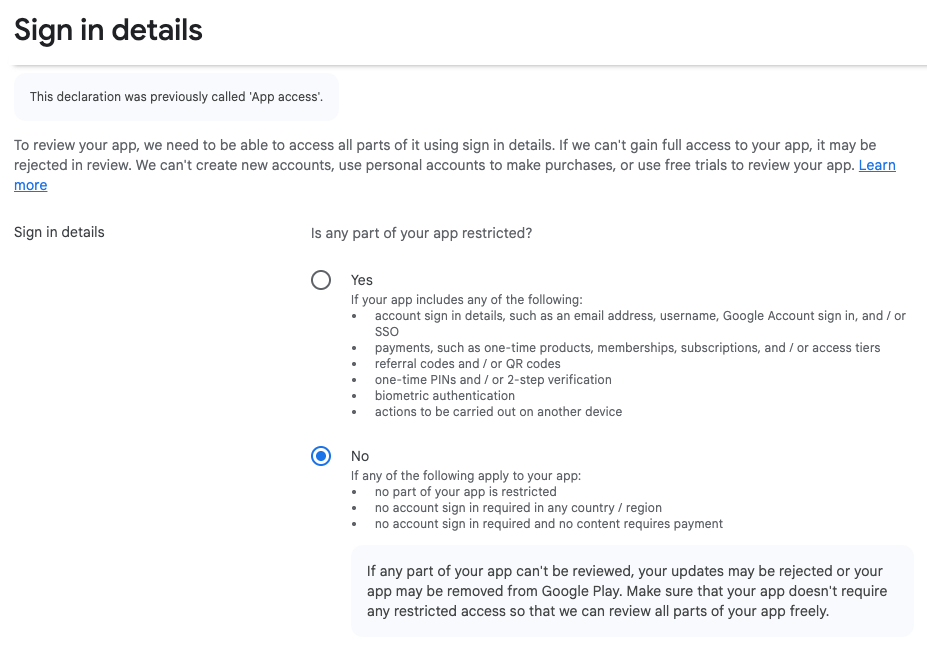
- Select "No" to indicate that no part of your app is restricted by sign-in credentials.
Target Audience and Content
- Indicate the age ranges that your app/station targets. Based on the Content Ratings you selected, Google will indicate any date ranges for which your app is uneligible. Then, click Next to proceed.

- Google will indicate whether or not you are eligible for their "Designed for Families" program. Click Next to proceed.

- This page will review your app's target age. Click Save to complete the survey.
